I'm not a software developer. I've never written serious code. But in a week, I went from a frustrated podcast listener to having a fully functional iOS app live on the App Store. This is the story of how I did it, what I learned —and how you can too.
Chapter 1: The Spark
I love podcasts. My queue was always growing faster than I could listen. I tried Snipd—a fantastic app that lets you adjust speed, create clips, and even chat with episodes. But even at faster speeds, I was falling behind.
Then I remembered an article I'd read years ago about blind individuals who had trained themselves to comprehend audio at 5x speed. Not because of superhuman hearing, but through neuroplasticity and gradual training. Scientific American covered this research, and you can hear samples of what 5x speed sounds like.
The insight: Speed isn't just a feature—it's a trainable skill. What if I could build an app that trains your brain progressively, like Duolingo for listening?
I didn't want summaries—they lose the essence and stories. I wanted to consume the full content, just faster. And I wanted the training to be automatic, gradual, and science-backed.
Chapter 2: Act I - The Web App (That Didn't Work)
The Plan
I'm technical, but not a developer. My instinct was to start simple: build a web app. Web technologies felt approachable. I thought an iOS app would be too complicated—Xcode, Swift, App Store submission... it all seemed intimidating.
So I started with Claude Code to build a web-based podcast player with progressive speed training.
The Reality Check
We ran headfirst into CORS (Cross-Origin Resource Sharing) errors. Podcast RSS feeds are hosted on different domains, and browsers block direct access for security reasons. To play audio from those feeds, we'd need:
- A proxy server to fetch the RSS feeds
- Backend infrastructure to stream audio
- Workarounds for every podcast host's different setup
- Dealing with HTTPS vs HTTP mixed content issues
We tried. We built proxy endpoints. We debugged CORS headers. But every fix revealed three new problems. What was supposed to be "simple" was becoming a backend engineering project.
💡 Lesson #1: Start with the platform that solves your core problems
I chose web because it felt "easier," not because it was the right platform for the job. Native iOS apps have built-in podcast playback, background audio, and lock screen controls. The web fights you at every turn for these features. I kept ignoring Claude's pleas to move to iOS for a lot longer than I should have!
Chapter 3: Act II - The iOS Pivot
The Intimidation Factor
After hours of wrestling with the web app and multiple gentle suggestions to switch to iOS, Claude suggested: "Why don't we build this as an iOS app? I can guide you through it."
My immediate thought: "I've never touched Xcode. I don't know Swift. The command line interface was already outside my comfort zone. This is crazy. I didn't want another big project."
But Claude's confidence was reassuring: "The tools are already built for this. Let me help you set up Xcode."
Day 1: Setting Up
Downloaded Xcode (took forever—it's huge). Claude guided me through creating my first iOS project. Bundle ID, deployment target, SwiftUI vs Storyboard... I had no idea what any of it meant. But I followed the steps.
We got "Hello World" running in the iOS Simulator. Seeing that app launch—even with just text on screen—was magical. This was real. It was actually happening.
Claude wrote the audio service. We tested it with a direct podcast URL. When I heard audio playing through the simulator, controlled by my app, I was hooked. This was feasible.
The pivotal moment: Realizing that the "hard stuff" (audio playback, increasing the speed but preserving the pitch, background processing, lock screen controls) was actually easier on iOS because Apple had already built the infrastructure. I just needed to wire it up.
Chapter 4: Act III - Building the MVP
Day 2-3: Core Features
Once we had basic audio playback working, we moved fast. Claude would write code, I'd test it in the simulator, we'd iterate. The workflow felt like having an expert pair programmer who never got tired of my many requests for changes and explanations. Claude got good at testing stuff with unit tests and in the simulator, fixing things and then hand off to me.
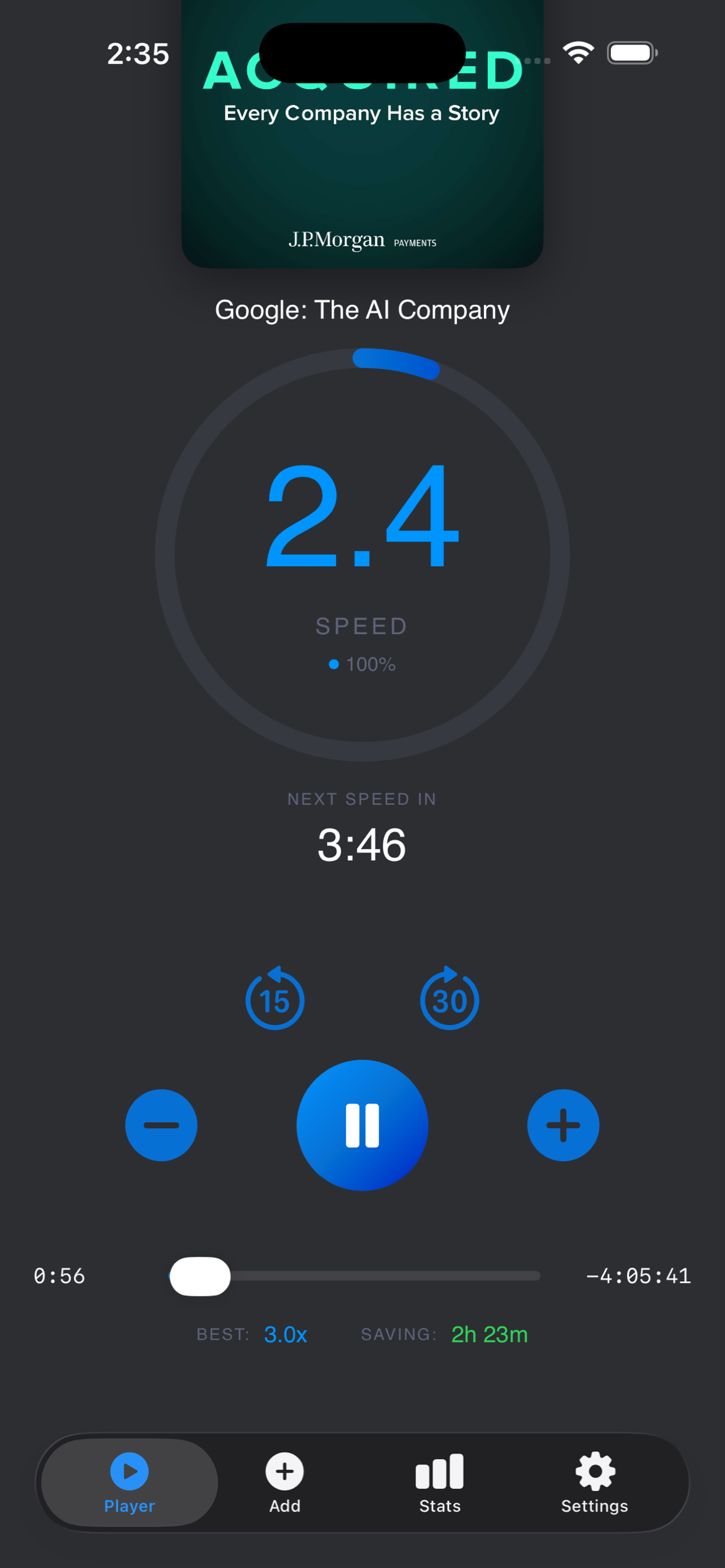
This was the heart of the app. We implemented a system where speed increases gradually based on listening time. The key insight: the increases has to be very gradual and deliberately unnoticeable. We used a positive version of the "boiling frog" story.
On iOS, we could fetch and parse RSS feeds directly—no proxy needed! We handled iTunes-specific tags, HTML in descriptions, missing artwork, all the edge cases of podcast RSS feeds.
This is where iOS shines. With proper audio session setup and Now Playing Info Center integration, we got background playback and lock screen controls working in hours, not days. Background playback was a key feature since we wanted users NOT to be looking at the phone.
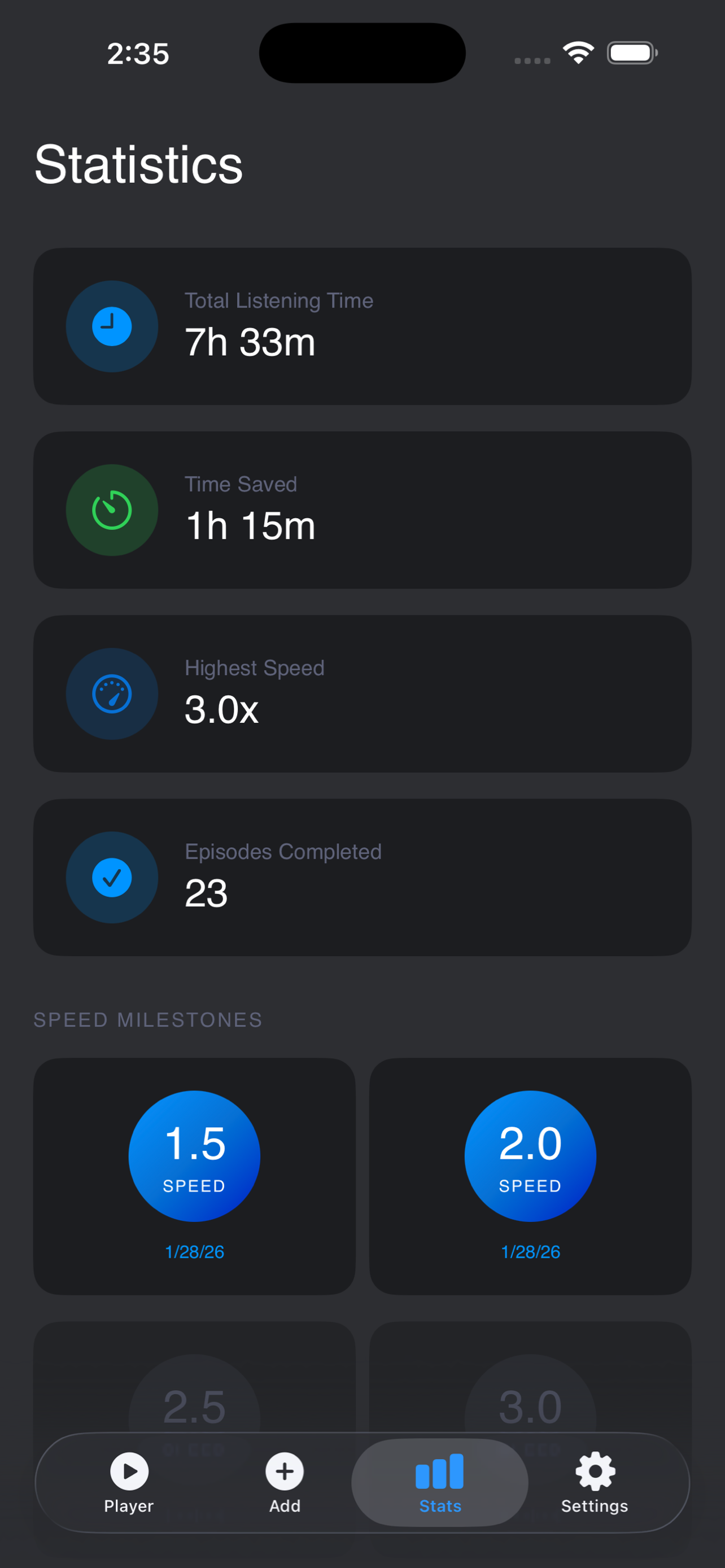
Total listening time, time saved, episodes completed, speed milestones. We stored everything locally using UserDefaults. No backend, no database, no complexity. Complete privacy.
💡 Lesson #2: Iterate in tight loops
We didn't build everything at once. We'd add one feature, test it thoroughly, then move to the next. Each working feature built confidence. Each bug fixed was a small win. Momentum compounds.
Day 3-4: Polish and Delight
Once the core worked, we added the elements that make it feel professional:
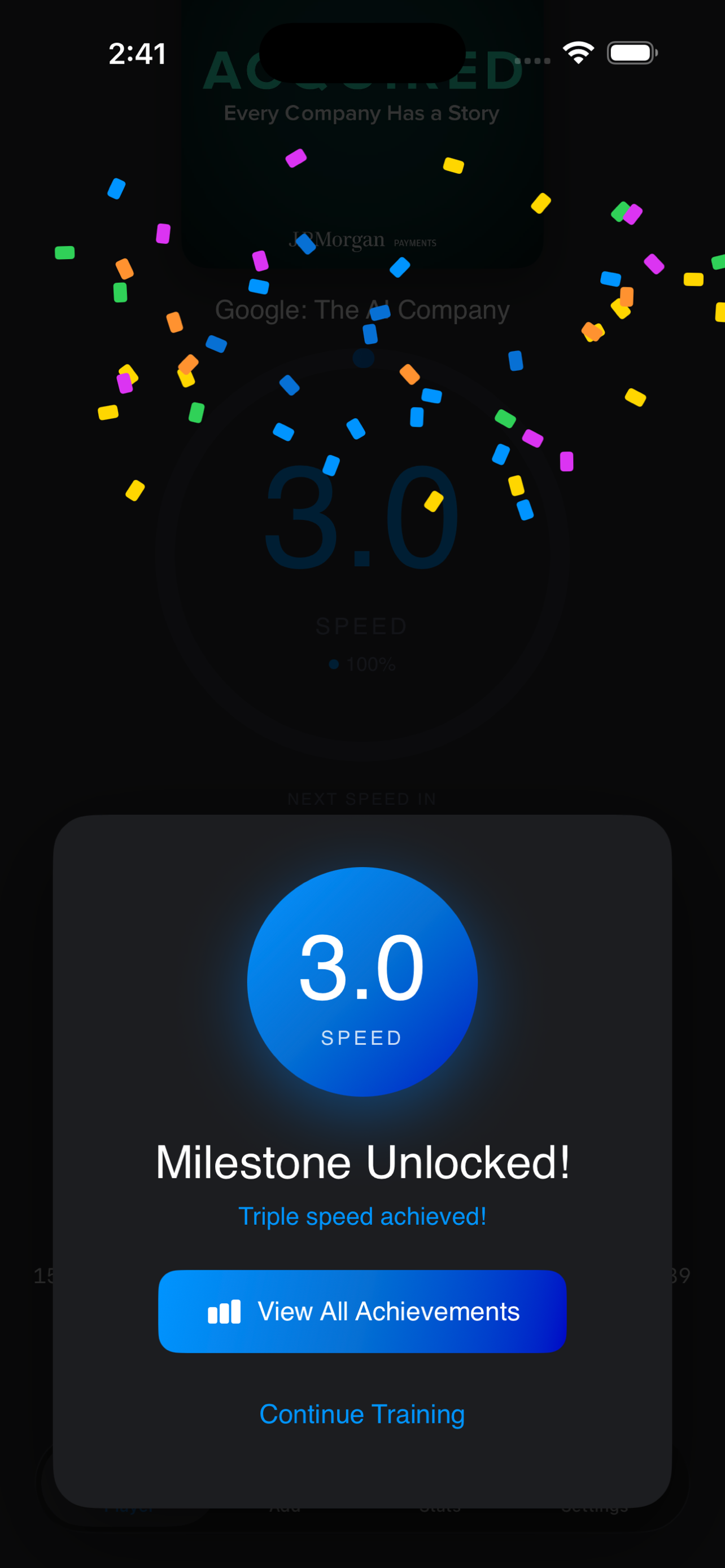
- Milestone celebrations: Confetti animation when you unlock 1.5x, 2.0x, etc.
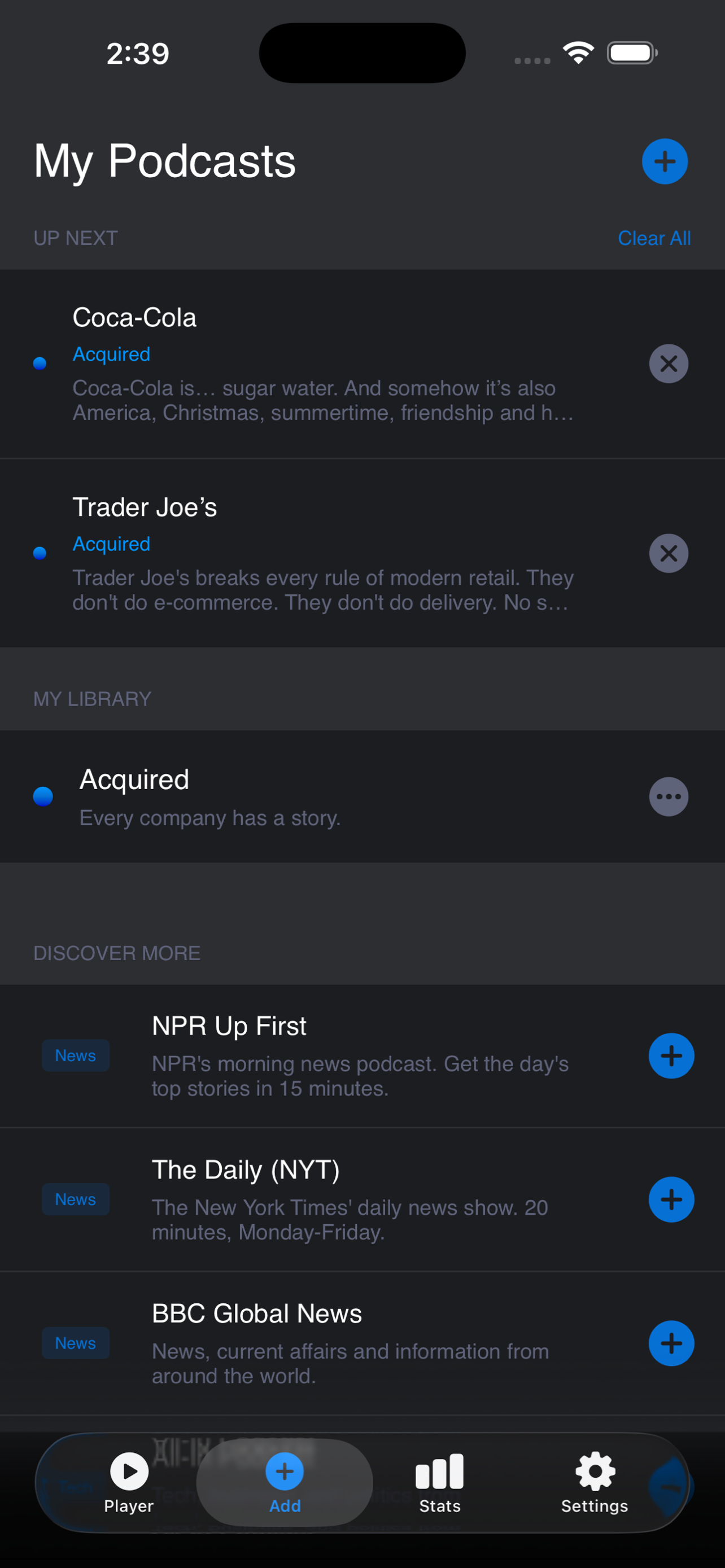
- Queue management: Add podcasts, build a listening queue, auto-advance
- Per-episode memory: Resume playback position and speed for each episode
- Training difficulty settings: Easy, Medium, Hard progression speeds
- Beautiful UI: Dark theme, gradient accents, smooth animations. I used the brand style guide from Petra Coaching as the input for Claude here.
"The difference between a working app and a delightful app is polish. And polish is just attention to small details, iterated many times."
Chapter 5: Act IV - The Agent Gauntlet
Evaluating Our Own Work
By Day 4, we had a working app. But was it good? I asked Claude to run the app and landing page through specialized AI agents—each with different expertise:
🧑🔬 User Researcher Agent
Focus: User experience, pain points, messaging clarity
Top insight: "The #1 user objection—'Will I still understand what I'm listening to?'—isn't addressed anywhere. This barrier blocks 50%+ of conversions."
💼 Executive Agent
Focus: Market positioning, business strategy, scalability
Top insight: "You're positioning a feature (speed training) when you should position a platform (productivity multiplier). This is Duolingo for listening."
⚙️ Engineer Agent
Focus: Technical feasibility, architecture, edge cases
Top insight: "The core implementation is production-ready. The speed progression algorithm is clever. Minor concern: UserDefaults dictionary growth needs pruning strategy at scale."
The Prioritization Exercise
The agents returned pages of feedback—both praise and improvements. Claude acted as orchestrator, synthesizing the feedback into ranked priorities:
- Critical: Add FAQ addressing comprehension anxiety (blocks 50% of users)
- High Impact: Reframe messaging around productivity benefit, not speed mechanism
- Medium Impact: Add social proof (testimonials) and quantified value props
- Low Impact: Polish items (Open Graph tags, analytics, etc.)
We didn't try to fix everything at once. We tackled the critical items first, then high impact, then medium. This staging approach kept us from getting overwhelmed.
💡 Lesson #3: Get multiple perspectives, then prioritize ruthlessly
The agents each saw different things. The user researcher caught UX issues. The executive saw strategic positioning gaps. The engineer spotted technical debt. Together, they gave us a 360° view. But the key was prioritization—what moves the needle most right now?
Chapter 6: Launch Prep
Day 5: App Store and Landing Page
The final day was all about making it real:
Set up the app in App Store Connect. Privacy policy, app description, keywords, age rating. Claude provided a detailed guide with copy-paste-ready text. What could have taken hours took 30 minutes.
Captured 5 app screenshots from the iPhone 17 Pro Max simulator. Fixed dimension issues (App Store is picky about exact pixel sizes). Added them to App Store Connect. Claude went beyond and created believable data for our simulator screenshots which was a nice touch.
Built a landing page on GitHub Pages. After our UX agent feedback, we completely transformed it—from "Train Your Brain to Listen Faster" to "Reclaim 50+ Hours Per Year." Added FAQ section, testimonials, visual journey, and benefit-focused messaging.
The Before and After
Before agent feedback:
- Tagline: "Train Your Brain to Listen Faster" (mechanism-focused)
- No FAQ section
- No testimonials or social proof
- Features listed generically
- No quantified value proposition
After transformation:
- Tagline: "Reclaim 50+ Hours Per Year" (benefit-focused)
- Comprehensive FAQ addressing comprehension concerns
- Beta tester testimonials
- Features reframed around outcomes
- Value props: 50+ hours saved, 2-5x speed, 100% comprehension
Estimated impact: Agents predicted 2-3x conversion rate improvement from these changes alone.
Chapter 7: Lessons for Builders
🎯 Lesson #1: Start Small, But Start
I didn't set out to build a perfect app. I set out to solve my own problem. The lesson from lean product development applies even more with AI: pick something you care about personally, build the simplest version that works, then iterate.
Your first version will have bugs. Your design will be rough. That's okay. Ship it, get feedback, improve.
🤝 Lesson #2: You Don't Need to Be an Expert—You Need a Partner
I was intimidated by iOS development. Xcode, Swift, App Store submission—it all seemed impossible. But Claude Code acted as my expert partner. I brought the vision and product sense. Claude brought the technical execution.
The command line interface felt foreign at first, but Claude made it approachable. Every error message was explained. Every decision was justified. I learned by doing, with a safety net.
🔄 Lesson #3: Embrace Pivots
We spent 2 days on the web app before pivoting to iOS. That felt like failure at the time. But those 2 days taught us what the core problem actually was. The pivot wasn't starting over—it was course-correcting with more information.
Don't be married to your first approach. Be married to solving the problem.
🎭 Lesson #4: Use Multiple Perspectives
The agent evaluation was a game-changer. Each agent (User Researcher, Executive, Engineer) saw things I missed. They disagreed with each other sometimes, which forced me to think critically about trade-offs.
You can do this too: ask Claude to evaluate your work from different perspectives. "How would a UX designer view this?" or "What would a marketing expert say?" You'll get surprisingly insightful feedback.
⚡ Lesson #5: Velocity Compounds
Day 1 felt slow—just getting audio to play. But by Day 3, we were adding features in hours. By Day 5, we were polishing and shipping. Early momentum creates later velocity.
The key: celebrate small wins. Every working feature is progress. Every bug fixed is a victory. Keep the flywheel spinning.
💰 Lesson #6: Be Cost-Conscious—Use the Right Tool for Each Job
This project burned through over $100 in API credits before I realized I was using a sledgehammer for some thumbtack jobs. Anthropic offers three models with very different costs and capabilities. Learning to match the model to the task is projected to save 50-70% on costs going forward.
Here's what I learned about model selection:
| Model | Cost | Best For | Avoid For |
|---|---|---|---|
| Haiku | $0.25/MTok | File reads, simple edits, git operations, typo fixes | Complex reasoning, architecture decisions |
| Sonnet 4.5 | $3/MTok | Feature development, refactoring, debugging | Simple file operations, repetitive tasks |
| Opus | $15/MTok | Architecture decisions, multi-agent analysis | Anything Haiku or Sonnet can handle |
The insight: Being explicit about cost constraints actually helped Claude make better decisions. When I said "use Haiku for simple tasks," it forced both of us to think clearly about what "simple" meant. Is updating an App Store link simple? Yes—use Haiku. Is designing a speed progression algorithm complex? Yes—use Sonnet.
This constraint wasn't limiting—it was clarifying. Most tasks in software development are simple edits, file reads, and git operations. Using a $15/MTok model for those is like hiring a surgeon to apply a band-aid. Save your expensive models for when you truly need their reasoning power.
Quick rule: Default to Haiku unless you need complex reasoning. Your wallet will thank you, and you'll ship just as fast.
Chapter 8: Bonus Tip - Document Your Guidelines
One thing that saved me later: creating a claude.md
file with cost optimization and operating guidelines. Now when I start a new session, Claude reads that file and knows my preferences:
which model for which task, when to ask before running expensive operations, how to batch simple tasks, how to show me a plan before doing any work, etc.
Think of it as creating a "working agreement" with your AI partner. It makes future sessions faster and cheaper because the context is already set. You're not re-explaining your preferences every time.
Chapter 9: What's Next
As I write this, FastCast is live on the App Store. The next chapters:
- User feedback: Gather reviews, fix bugs, iterate on features based on real usage
- Positioning and pricing: Figure out the right monetization strategy
- Growth: Learn what resonates, double down on what works
- New features: Audiobook support, cross-device sync, social sharing of milestones
But the real journey has been this: proving to myself that the intimidation was worse than the reality. Building software with AI isn't about being a developer. It's about being a builder—someone with a vision and the determination to iterate with a good and patient partner until it's real.
You don't need to know how to code. You need to know what problem you're solving and be willing to work through the messy middle. The tools are there. The help is there. The only question is: what are you going to build?
When the cost of building solutions is dropping rapidly, the value of asking good questions is even more important.
Try It Yourself
If you're reading this and thinking "I could never do that," I felt the same way 5 days ago. Here's how to start:
- Pick a problem you personally experience. The best products come from scratching your own itch.
- Start with Claude Code. It's free to try. Open a conversation and say: "I want to build [X]. I've never coded before. Where should I start?" I got my feet wet with this great Claude Code for PMs which uses Claude Code to teach.
- Expect false starts. Our web app didn't work. That's normal. Pivots aren't failures—they're learning. Stay fixed on the goal. Stay flexible on the path to get there.
- Ship early. Get something working, show people, get feedback. Perfect is the enemy of shipped.
- Use the agent evaluation trick. Ask Claude to review your work from multiple perspectives. You'll catch blindspots.
Want to Try FastCast?
Download and experience progressive speed training for yourself.
Download on the App StoreWritten by Randhir, a non-developer who learned that building software is less about coding skills and more about problem-solving persistence. You can follow the journey at FastCast or reach out via GitHub.